1、添加依赖
uv add fastapi uvicorn2、修改程序
import os
import re
import sys
import time
import shutil
from concurrent.futures import ThreadPoolExecutor, as_completed

from googlesearch import search
import requests
from bs4 import BeautifulSoup
import backoff
import openai
from fastapi import FastAPI
from fastapi.staticfiles import StaticFiles
from fastapi.responses import FileResponse

app = FastAPI()

# 挂载静态文件目录
app.mount("/static", StaticFiles(directory="static"), name="static")

# Default configuration and Prompts
NUM_SEARCH = 10  # Number of links to parse from Google
SEARCH_TIME_LIMIT = 3  # Max seconds to request website sources before skipping to the next URL
TOTAL_TIMEOUT = 6  # Overall timeout for all operations
MAX_CONTENT = 500  # Number of words to add to LLM context for each search result

# 这里我修改了最大TOKENS值为默认的4K,它最大能到8K,但意义不大,官方文档其实也建议就4K即可
MAX_TOKENS = 4096  # Maximum number of tokens LLM generates
# 这里我修改成了'deepseek-reasoner',默认模型的回复里其实有一个字段叫做
# reasoner,这是openai库最新更新了的东西,但其实对于调用来说,除非你想看<think></think>
# 标签里的东西,否则其实一行代码都不需要去改动
LLM_MODEL = 'deepseek-reasoner'  # 'gpt-3.5-turbo' #'gpt-4o'

system_prompt_search = """You are a helpful assistant whose primary goal is to decide if a user's query requires a Google search."""
search_prompt = """
Decide if a user's query requires a Google search. You should use Google search for most queries to find the most accurate and updated information. Follow these conditions:

- If the query does not require Google search, you must output "ns", short for no search.
- If the query requires Google search, you must respond with a reformulated user query for Google search.
- User query may sometimes refer to previous messages. Make sure your Google search considers the entire message history.

User Query:
{query}
"""

system_prompt_answer = """You are a helpful assistant who is expert at answering user's queries"""
answer_prompt = """Generate a response that is informative and relevant to the user's query
User Query:
{query}
"""

system_prompt_cited_answer = """You are a helpful assistant who is expert at answering user's queries based on the cited context."""
cited_answer_prompt = """
Provide a relevant, informative response to the user's query using the given context (search results with [citation number](website link) and brief descriptions).

- Answer directly without referring the user to any external links.
- Use an unbiased, journalistic tone and avoid repeating text.
- Format your response in markdown with bullet points for clarity.
- Cite all information using [citation number](website link) notation, matching each part of your answer to its source.

Context Block:
{context_block}

User Query:
{query}
"""

# Set up OpenAI API key
OPENAI_API_KEY = os.getenv('OPENAI_API_KEY')

if not OPENAI_API_KEY:
    raise ValueError("OpenAI API key is not set. Please set the OPENAI_API_KEY environment variable.")

client = openai.OpenAI(api_key=OPENAI_API_KEY, base_url="https://api.deepseek.com")


def trace_function_factory(start):
    """Create a trace function to timeout request"""

    def trace_function(frame, event, arg):
        if time.time() - start > TOTAL_TIMEOUT:
            raise TimeoutError('Website fetching timed out')
        return trace_function

    return trace_function


def fetch_webpage(url, timeout):
    """Fetch the content of a webpage given a URL and a timeout."""
    start = time.time()
    sys.settrace(trace_function_factory(start))
    try:
        print(f"Fetching link: {url}")
        response = requests.get(url, timeout=timeout)
        response.raise_for_status()
        soup = BeautifulSoup(response.text, 'lxml')
        paragraphs = soup.find_all('p')
        page_text = ' '.join([para.get_text() for para in paragraphs])
        return url, page_text
    except (requests.exceptions.RequestException, TimeoutError) as e:
        print(f"Error fetching {url}: {e}")
    finally:
        sys.settrace(None)
    return url, None


def parse_google_results(query, num_search=NUM_SEARCH, search_time_limit=SEARCH_TIME_LIMIT):
    """Perform a Google search and parse the content of the top results."""
    urls = search(query, num_results=num_search)
    max_workers = os.cpu_count() or 1  # Fallback to 1 if os.cpu_count() returns None
    with ThreadPoolExecutor(max_workers=max_workers) as executor:
        future_to_url = {executor.submit(fetch_webpage, url, search_time_limit): url for url in urls}
        return {url: page_text for future in as_completed(future_to_url) if (url := future.result()[0]) and (
                page_text := future.result()[1])}


# 这里我加入了, encoding='utf-8',解决了原版的markdown文件输出乱码的问题
def save_markdown(content, file_path):
    with open(file_path, 'a', encoding='utf-8') as file:
        file.write(content)


@backoff.on_exception(backoff.expo, (openai.RateLimitError, openai.APITimeoutError))
def llm_check_search(query, file_path, msg_history=None, llm_model=LLM_MODEL):
    """Check if query requires search and execute Google search."""
    prompt = search_prompt.format(query=query)
    msg_history = msg_history or []
    new_msg_history = msg_history + [{"role": "user", "content": prompt}]
    response = client.chat.completions.create(
        model=llm_model,
        messages=[{"role": "system", "content": system_prompt_search}, *new_msg_history],
        max_tokens=30
    ).choices[0].message.content

    # check if the response contains "ns"
    cleaned_response = response.lower().strip()
    if re.fullmatch(r"\bns\b", cleaned_response):
        print("No Google search required.")
        return None
    else:
        print(f"Performing Google search: {cleaned_response}")
        search_dic = parse_google_results(cleaned_response)
        # Format search result in dic into markdown format
        search_result_md = "\n".join([f"{number + 1}. {link}" for number, link in enumerate(search_dic.keys())])
        save_markdown(f"## Sources\n{search_result_md}\n\n", file_path)
        return search_dic


@backoff.on_exception(backoff.expo, (openai.RateLimitError, openai.APITimeoutError))
def llm_answer(query, file_path, msg_history=None, search_dic=None, llm_model=LLM_MODEL, max_content=MAX_CONTENT,
               max_tokens=MAX_TOKENS, debug=False):
    """Build the prompt for the language model including the search results context."""
    if search_dic:
        context_block = "\n".join(
            [f"[{i + 1}]({url}): {content[:max_content]}" for i, (url, content) in enumerate(search_dic.items())])
        prompt = cited_answer_prompt.format(context_block=context_block, query=query)
        system_prompt = system_prompt_cited_answer
    else:
        prompt = answer_prompt.format(query=query)
        system_prompt = system_prompt_answer

    """Generate a response using the OpenAI language model with stream completion"""
    msg_history = msg_history or []
    new_msg_history = msg_history + [{"role": "user", "content": prompt}]
    response = client.chat.completions.create(
        model=llm_model,
        messages=[{"role": "system", "content": system_prompt}, *new_msg_history],
        max_tokens=max_tokens,
        stream=True
    )

    print("\n" + "*" * 20 + " LLM START " + "*" * 20)
    save_markdown(f"## Answer\n", file_path)
    content = []
    for chunk in response:
        chunk_content = chunk.choices[0].delta.content
        if chunk_content:
            content.append(chunk_content)
            print(chunk_content, end="")
            save_markdown(chunk_content, file_path)

    print("\n" + "*" * 21 + " LLM END " + "*" * 21 + "\n")
    # change the line for the next question
    save_markdown("\n\n", file_path)
    new_msg_history = new_msg_history + [{"role": "assistant", "content": ''.join(content)}]

    return new_msg_history

@app.get("/")
async def read_index():
    return FileResponse('static/index.html')

@app.post("/ask")
async def ask(query: str):
    msg_history = None
    file_path = "playground.md"
    save_path = None
    # start with an empty file
    with open(file_path, 'w') as file:
        pass

    save_markdown(f"# {query}\n\n", file_path)
    search_dic = llm_check_search(query, file_path, msg_history)
    msg_history = llm_answer(query, file_path, msg_history, search_dic)
    save_path = save_path or f"{query}.md"  # ensure saved file has the first query as its name
    print(f"AI response recorded into {file_path}")

    with open(file_path, 'r', encoding='utf-8') as file:
        response_content = file.read()

    return {"response": response_content}


if __name__ == "__main__":
    import uvicorn

    uvicorn.run(app, host="0.0.0.0", port=8000)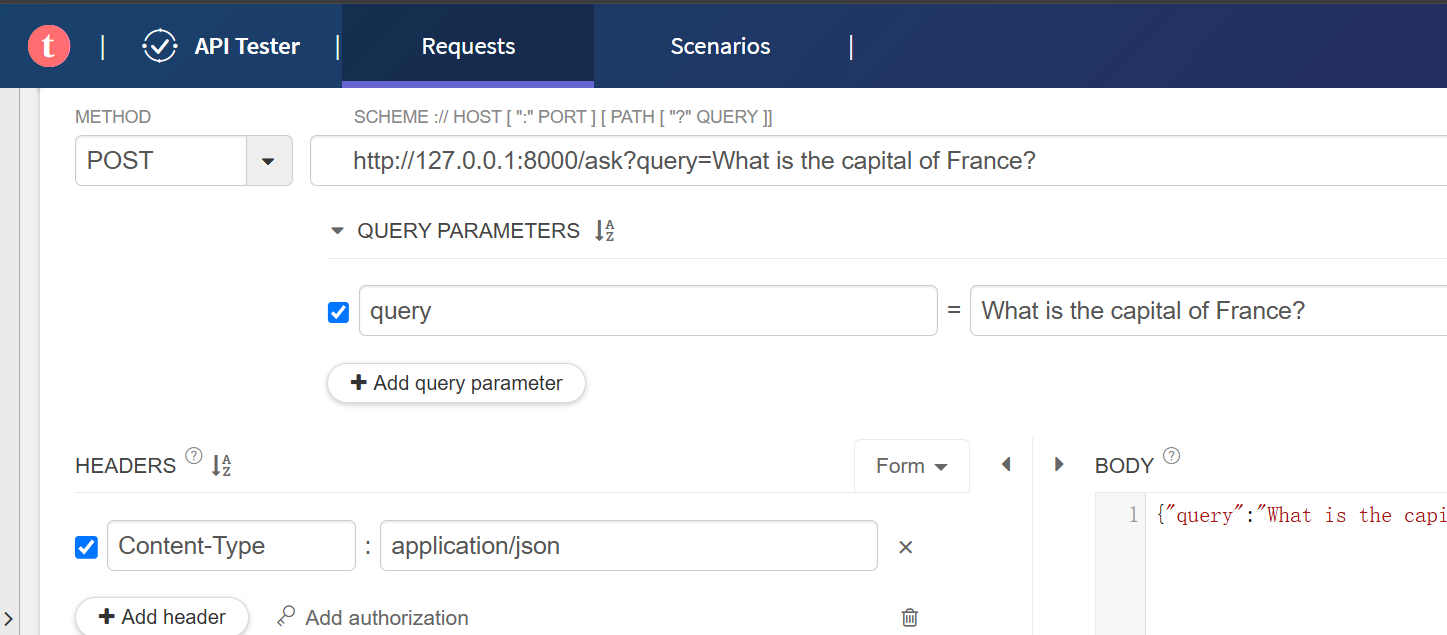
测试
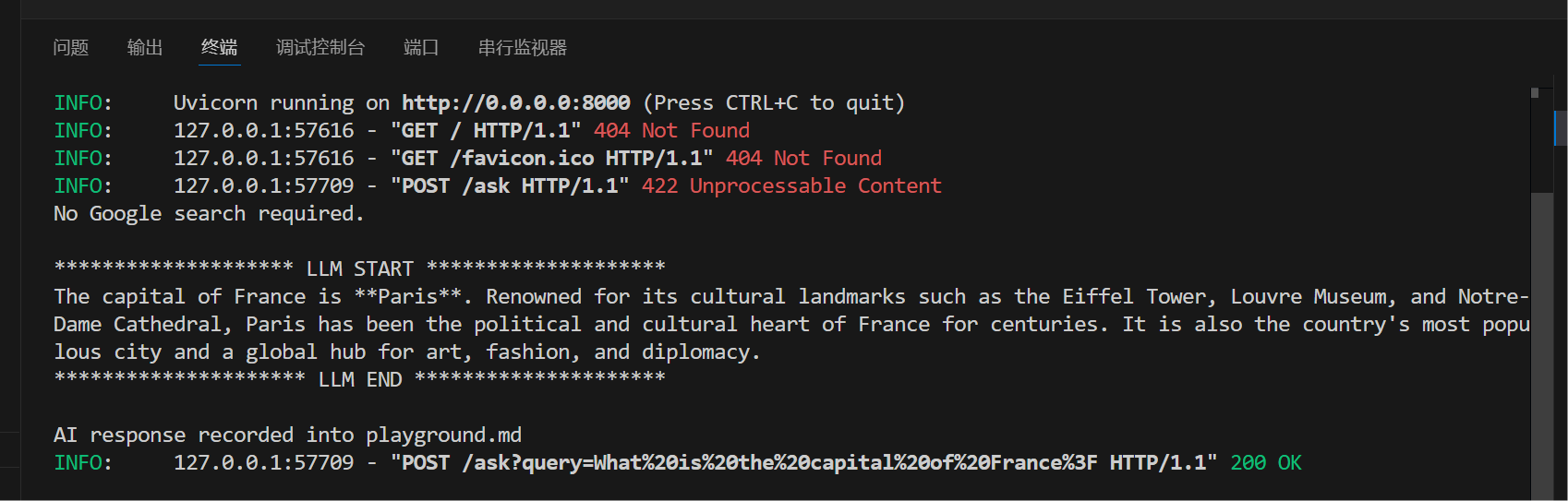
终端输出
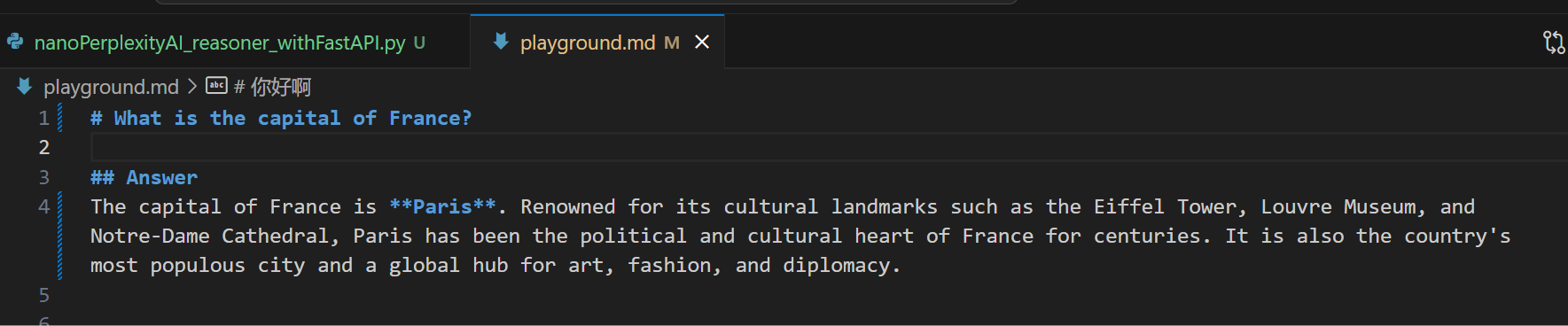
实际的md输出
最终的http的输出
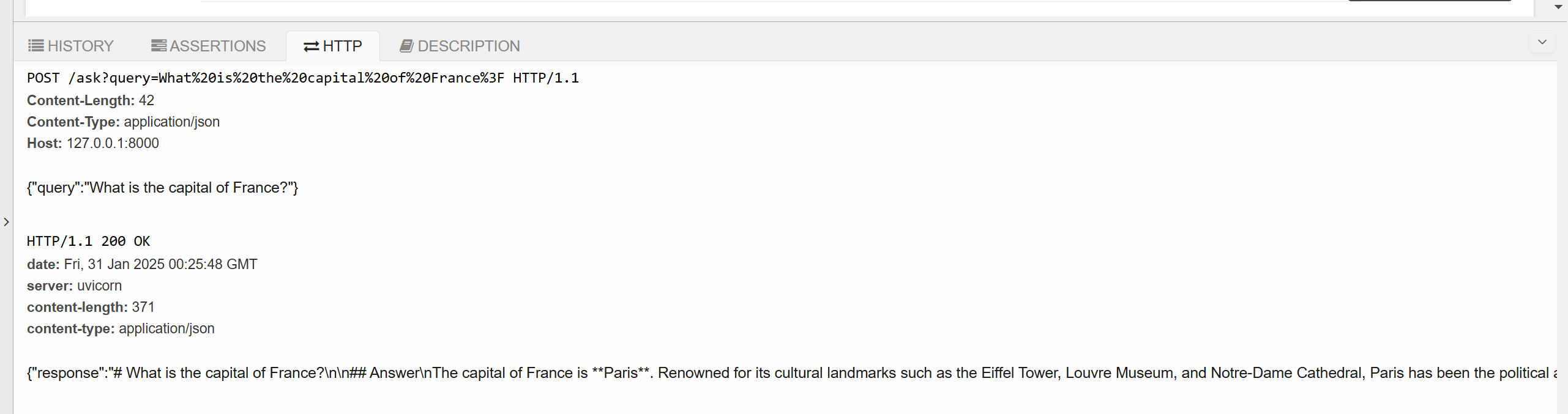
3、HTTP接口这里已经很不错了
接着是index.html
<!DOCTYPE html>
<html lang="zh-CN">

<head>
    <meta charset="UTF-8">
    <meta name="viewport" content="width=device-width, initial-scale=1.0">
    <title>简易AI搜索引擎</title>
    <style>
        body {
            font-family: Arial, sans-serif;
            margin: 0;
            padding: 0;
            display: flex;
            flex-direction: column;
            height: 100vh;
        }

        #chat-container {
            flex: 1;
            overflow-y: auto;
            padding: 10px;
            border-bottom: 1px solid #ccc;
        }

        #input-container {
            display: flex;
            padding: 10px;
        }

        #question-input {
            flex: 1;
            padding: 5px;
            margin-right: 10px;
        }

        #send-button {
            padding: 5px 10px;
        }
    </style>
    <script src="https://cdn.jsdelivr.net/npm/marked/marked.min.js"></script>
</head>

<body>
    <div id="chat-container">
        <!-- 聊天记录将显示在这里 -->
    </div>
    <div id="input-container">
        <input type="text" id="question-input" placeholder="输入你的问题">
        <button id="send-button">发送</button>
    </div>

    <script>
        const chatContainer = document.getElementById('chat-container');
        const questionInput = document.getElementById('question-input');
        const sendButton = document.getElementById('send-button');

        // 支持回车发送
        questionInput.addEventListener('keydown', (event) => {
            if (event.key === 'Enter') {
                sendButton.click();
            }
        });

        sendButton.addEventListener('click', async () => {
            const question = questionInput.value.trim();
            if (question === '') return;

            // 显示用户的问题
            const userMessage = document.createElement('p');
            userMessage.textContent = `你: ${question}`;
            chatContainer.appendChild(userMessage);
            chatContainer.scrollTop = chatContainer.scrollHeight;

            // 显示加载提示
            const loadingMessage = document.createElement('p');
            loadingMessage.textContent = 'AI正在思考中...';
            chatContainer.appendChild(loadingMessage);
            chatContainer.scrollTop = chatContainer.scrollHeight;

            try {
                // 构建带有查询参数的 URL
                const apiUrl = `/ask?query=${encodeURIComponent(question)}`;
                // 使用 POST 方法调用后端接口
                const response = await fetch(apiUrl, {
                    method: 'POST',
                    headers: {
                        'Content-Type': 'application/json'
                    }
                });

                // 移除加载提示
                chatContainer.removeChild(loadingMessage);

                if (!response.ok) {
                    throw new Error(`HTTP 错误! 状态码: ${response.status}`);
                }

                const data = await response.json();
                const answer = data.response;

                // 将 Markdown 转换为 HTML
                const htmlAnswer = marked.parse(answer);

                // 显示 AI 的回答
                const aiMessage = document.createElement('div');
                aiMessage.innerHTML = `AI: <br>${htmlAnswer}`;
                chatContainer.appendChild(aiMessage);
                chatContainer.scrollTop = chatContainer.scrollHeight;

            } catch (error) {
                // 移除加载提示
                if (loadingMessage.parentNode) {
                    chatContainer.removeChild(loadingMessage);
                }
                // 显示错误信息
                let errorMessageText;
                if (error instanceof TypeError) {
                    errorMessageText = `网络错误,请检查网络连接: ${error.message}`;
                } else if (error instanceof SyntaxError) {
                    errorMessageText = `数据解析错误: ${error.message}`;
                } else {
                    errorMessageText = `错误: ${error.message}`;
                }
                const errorMessage = document.createElement('p');
                errorMessage.textContent = errorMessageText;
                chatContainer.appendChild(errorMessage);
                chatContainer.scrollTop = chatContainer.scrollHeight;
            }

            // 清空输入框
            questionInput.value = '';
        });
    </script>
</body>

</html>
4、最终结果
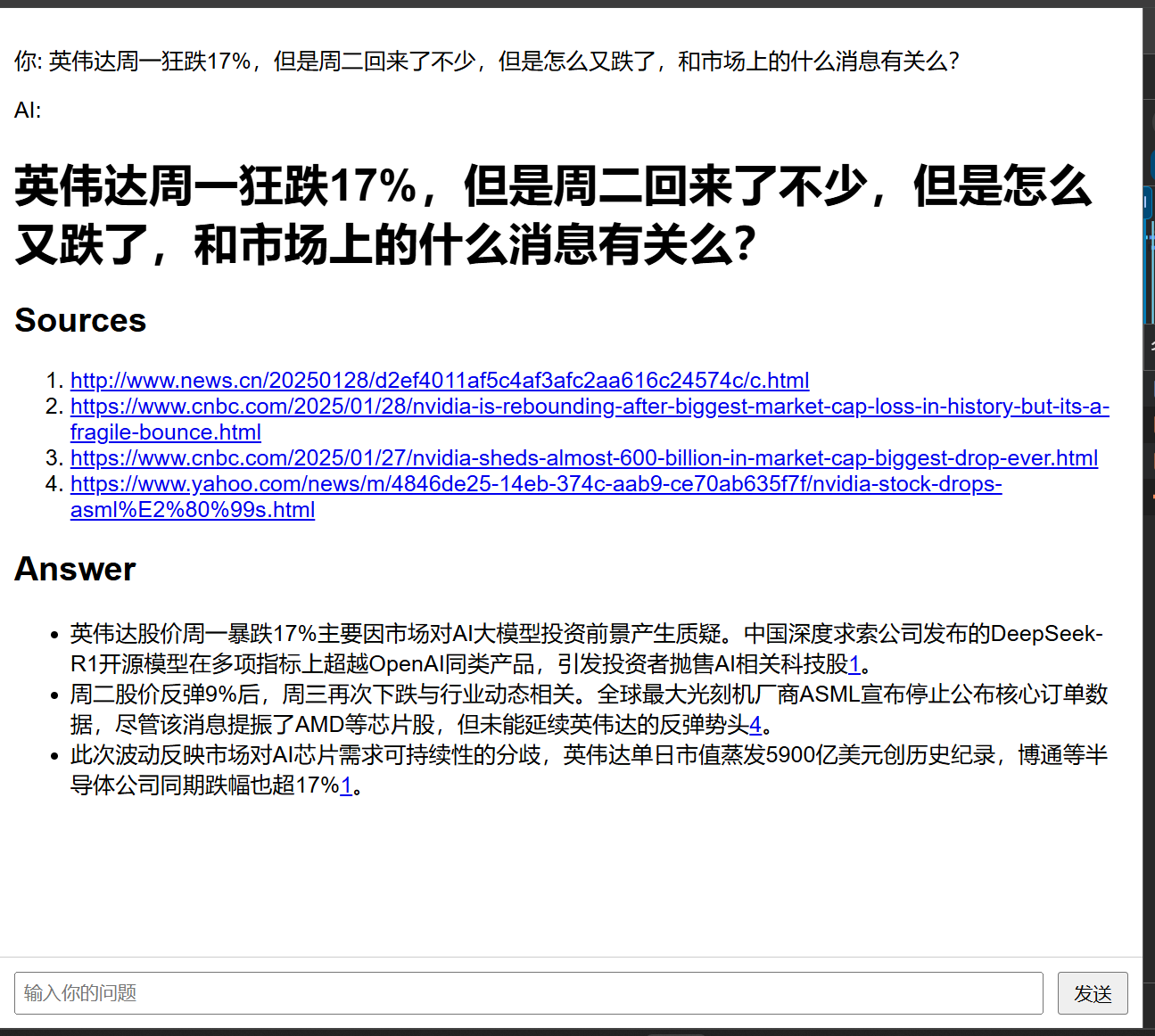
简直是爽歪歪
5、实际部署:
export OPENAI_API_KEY="xxxxxxx"bashrc里写入密钥
添加dns的记录
server {
    listen 80;
    server_name asearch.lemonhall.me;
    # enforce https
    return 301 https://$server_name:443$request_uri;
}
server {
    listen 443 ssl http2;
    server_name asearch.lemonhall.me;
    ssl_certificate /etc/letsencrypt/live/172-233-73-134.ip.linodeusercontent.com/fullchain.pem;
    ssl_certificate_key /etc/letsencrypt/live/172-233-73-134.ip.linodeusercontent.com/privkey.pem;
    location / {
        auth_basic           "Administrator’s Area";
        auth_basic_user_file /etc/apache2/.htpasswd;
        proxy_pass http://127.0.0.1:8157/;
        proxy_set_header Host $host;
        proxy_set_header Upgrade $http_upgrade;
        proxy_set_header Connection upgrade;
        proxy_set_header Accept-Encoding gzip;
    }
}
重启一下服务器
sudo systemctl reload nginx重置一下密码
sudo htpasswd /etc/apache2/.htpasswd lemonhall最后一个问题是,这个python脚本需要开机自己启动啊
6、服务化
1. 安装 supervisor
sudo apt-get install supervisor2. 创建配置文件
sudo vim /etc/supervisor/conf.d/nanoPerplexityAI_reasoner_withFastAPI.conf3、输入内容
[program:nanoPerplexityAI_reasoner_withFastAPI]
; 启动 Python 脚本的完整命令,使用指定的 Python 解释器
command = /home/lemonhall/news_checker/.venv/bin/python /home/lemonhall/news_checker/nanoPerplexityAI_reasoner_withFastAPI.py
; 确保 supervisor 启动时自动启动该程序
autostart = true
; 当程序异常退出时自动重启
autorestart = true
; 程序启动前的延迟时间(秒)
startsecs = 5
; 重试启动的最大次数
startretries = 3
; 指定运行该程序的用户
user = lemonhall
; 程序的工作目录
directory = /home/lemonhall/news_checker
; 标准错误输出日志文件路径
stderr_logfile = /var/log/nanoPerplexityAI_reasoner_withFastAPI.err.log
; 标准输出日志文件路径
stdout_logfile = /var/log/nanoPerplexityAI_reasoner_withFastAPI.out.log
; 设置环境变量
environment = OPENAI_API_KEY= "xxxxxxxxx"
4、重新加载 supervisor 配置
执行以下命令让 supervisor 重新读取配置文件并更新管理的程序列表:
sudo supervisorctl reread
sudo supervisorctl update
5、管理程序
- 启动程序:
sudo supervisorctl start nanoPerplexityAI_reasoner_withFastAPI
6、查看日志
cat nanoPerplexityAI_reasoner_withFastAPI.out.log
7、设置超时时间
    # 设置超时
    proxy_connect_timeout  60s;      # 连接到后端的超时时间
    proxy_read_timeout     300s;     # 从后端读取响应的超时时间
    proxy_send_timeout     60s;      # 向后端发送请求的超时时间
8、查看状态
sudo supervisorctl status nanoPerplexityAI_reasoner_withFastAPI

9、保证开机自启动
sudo systemctl enable supervisor