https://playwright.dev/python/docs/codegen#preserve-authenticated-state
Preserve authenticated state
Run codegen with --save-storage to save cookies and localStorage at the end of the session. This is useful to separately record an authentication step and reuse it later when recording more tests.
playwright codegen https://www.doubao.com/chat/ --save-storage=auth.json登录之后操作一下哈:
playwright codegen --load-storage=auth.json https://www.doubao.com/chat/ 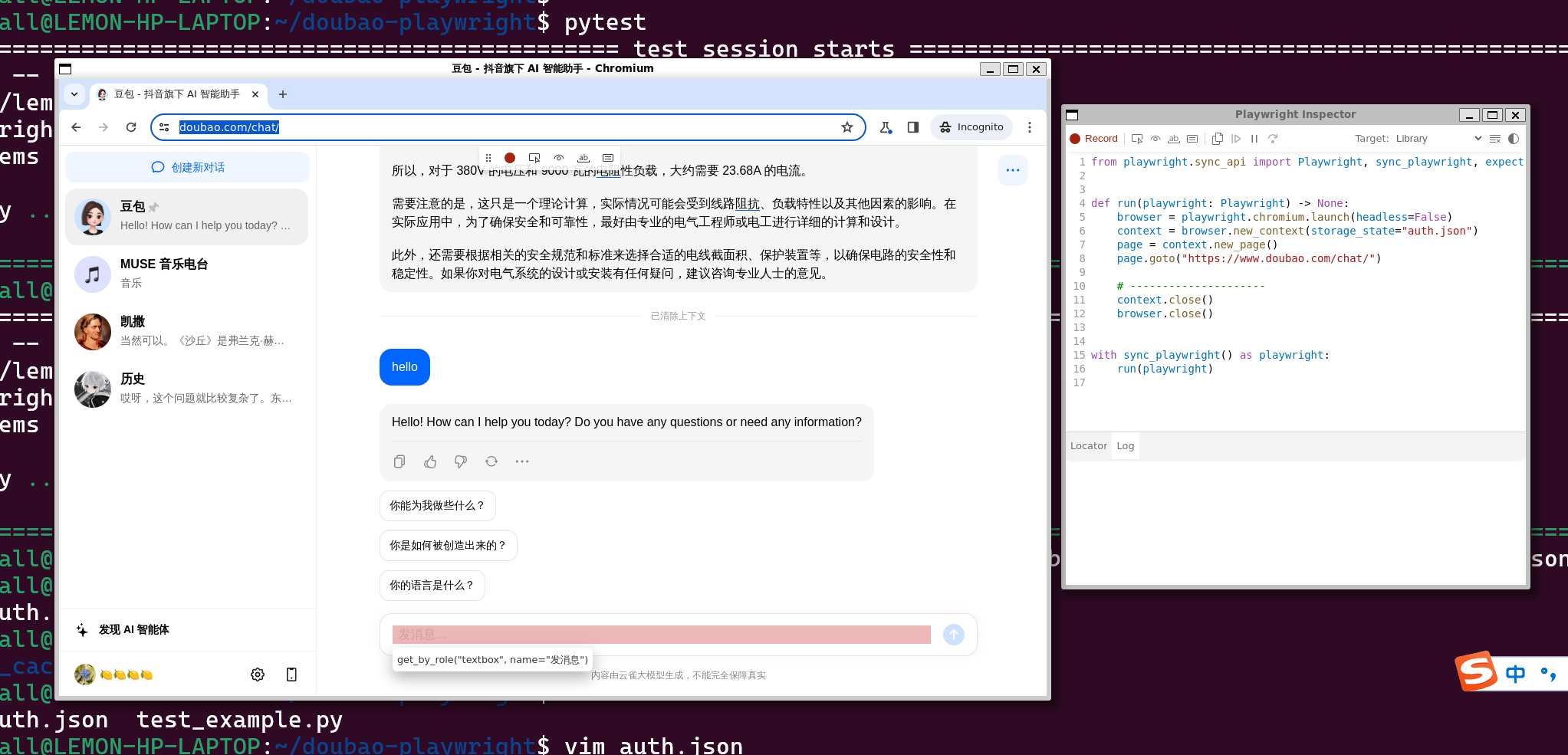
from playwright.sync_api import Playwright, sync_playwright, expect


def run(playwright: Playwright) -> None:
    browser = playwright.chromium.launch(headless=False)
    context = browser.new_context(storage_state="auth.json")
    page = context.new_page()
    page.goto("https://www.doubao.com/chat/")

    # ---------------------
    context.close()
    browser.close()


with sync_playwright() as playwright:
    run(playwright)
然后看下来发消息就是
    page.get_by_role("textbox", name="发消息").click()
    page.get_by_role("textbox", name="发消息").fill("hi")
    page.get_by_role("button", name="发送").click()
然后就有一个很尴尬的事情就是不知道怎么去看所谓的respones啊
当下想到的办法就是等5秒钟左右:
然后:
page.locator(".action-button-f4a696 > .semi-button").first.click()之后剪贴板里的内容是啥就是回复了
https://playwrightsolutions.com/how-do-i-access-the-browser-clipboard-with-playwright/
但是看来要访问剪切板也不是那么容易的好吧
最后就搞定了
爽啊
import time
from playwright.sync_api import Playwright, sync_playwright, expect


def send_input(page,input):
    #第二步:say hi
    page.get_by_role("textbox", name="发消息").click()
    page.get_by_role("textbox", name="发消息").fill(input)
    page.get_by_role("button", name="发送").click()

    #第三步:等待
    # 暂停 5 秒钟
    time.sleep(5)

    #第四步:取剪贴板
    page.locator(".action-button-f4a696 > .semi-button").first.click()
    response_text = page.evaluate("navigator.clipboard.readText()")

    return response_text

def run(playwright: Playwright) -> None:
    browser = playwright.chromium.launch(headless=False)
    context = browser.new_context(storage_state="auth.json")

    #第一步:取得剪切板的授权
    context.grant_permissions(['clipboard-read','clipboard-write'])
    page = context.new_page()
    page.goto("https://www.doubao.com/chat/")

    while True:
        user_input = input("请输入一些内容:")
        res_text= send_input(page,user_input)
        print("豆包:",res_text)

    # ---------------------
    context.close()
    browser.close()


with sync_playwright() as playwright:
    run(playwright)