1、原插件地址:
https://forums.rpgmakerweb.com/index.php?threads/embed-a-website-into-a-popup.160329/#post-1373749
2、自定义弹出自己的Menu的教程:
https://www.youtube.com/watch?v=2DnYEfScybo
3、需求:
原版插件不错,代码清晰,但是它用的是
class Scene_WebViewer extends Scene_Base我修改成了:
class Scene_WebViewer extends Scene_MenuBase为什么呢?
因为我发现弹出Scene_MenuBase,背景是模糊的,所以这样,就可以做到更好的融合感,而不是仅仅在窗口里弹出来一个网页
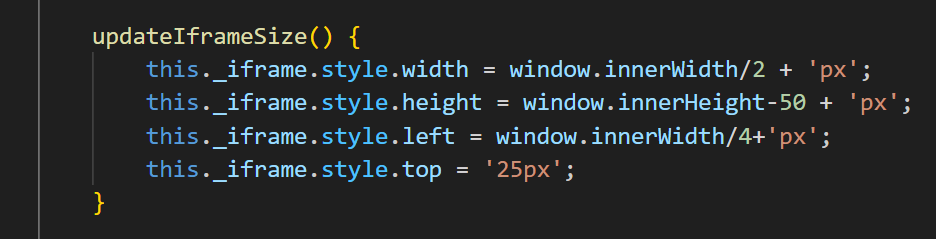
所以我还将初始化大小宽度高度和位移的代码也修改了:
/*:
 * @target MZ
 * @plugindesc Web Viewer for RPG MAKER MZ
 * @author Maxii1996 | Undermax Games And was modifiy by lemonhall with MenuBase
 *
 * @command showWebViewer
 * @text Show Web Viewer
 * @desc Displays the web viewer with the specified URL.
 *
 * @arg url
 * @type string
 * @text URL
 * @desc URL to be loaded in the web viewer.
 * @default https://www.example.com
 *
 * @param closeButtonSize
 * @type number
 * @text Close Button Size
 * @desc Size of the close button in pixels.
 * @default 30
 *
 * @param closeButtonPosition
 * @type select
 * @text Close Button Position
 * @desc Position of the close button.
 * @default Top Right
 * @option Top Left
 * @option Top Center
 * @option Top Right
 * @option Bottom Left
 * @option Bottom Center
 * @option Bottom Right
 *
 * @help
 * To open the web viewer, use the plugin command "Show Web Viewer" in events.
 */

(() => {
    const pluginName = "WebViewerMZ2";
    const parameters = PluginManager.parameters(pluginName);


    PluginManager.registerCommand(pluginName, "showWebViewer", args => {
        SceneManager.push(Scene_WebViewer);
        Scene_WebViewer.prototype.url = args.url;
    });

    class Scene_WebViewer extends Scene_MenuBase {
        create() {
            super.create();
            this.createLoadingText();
            this.createIframe();
            this.createCloseButton();
        }


        createCloseButton() {
            this._closeButton = document.createElement('button');
            this._closeButton.innerText = 'X';
            this._closeButton.style.position = 'absolute';
            this._closeButton.style.width = parameters.closeButtonSize + 'px';
            this._closeButton.style.height = parameters.closeButtonSize + 'px';
            this._closeButton.style.zIndex = 10000; // Ensure it's above the iframe
            this.setButtonPosition();
            this._closeButton.onclick = this.closeScene.bind(this);
            document.body.appendChild(this._closeButton);
        }

        createLoadingText() {
            this._loadingText = new PIXI.Text('Loading...', { fontSize: 28, fill: 0xffffff });
            this._loadingText.x = (Graphics.width - this._loadingText.width) / 2;
            this._loadingText.y = (Graphics.height - this._loadingText.height) / 2;
            this.addChild(this._loadingText);
        }

        createIframe() {

            this._iframe = document.createElement('iframe');
            this.updateIframeSize();
            this._iframe.src = this.url;
            this._iframe.style.border = 'none';
            this._iframe.style.position = 'absolute';
            this._iframe.style.zIndex = 9999;
            this._iframe.style.backgroundColor = 'white';
            this._iframe.onload = this.onIframeLoad.bind(this);
            document.body.appendChild(this._iframe);
            window.addEventListener('resize', this.onWindowResize.bind(this));
            document.addEventListener('keydown', this.onGlobalKeydown.bind(this));
        }

        setButtonPosition() {
            const position = parameters.closeButtonPosition;
            const width = Graphics.width;
            const height = Graphics.height;
            const size = parseInt(parameters.closeButtonSize);

            switch (position) {
                case "Top Left":
                    this._closeButton.style.left = '10px';
                    this._closeButton.style.top = '10px';
                    break;
                case "Top Center":
                    this._closeButton.style.left = (width - size) / 2 + 'px';
                    this._closeButton.style.top = '10px';
                    break;
                case "Top Right":
                    this._closeButton.style.right = '10px';
                    this._closeButton.style.top = '10px';
                    break;
                case "Bottom Left":
                    this._closeButton.style.left = '10px';
                    this._closeButton.style.bottom = '10px';
                    break;
                case "Bottom Center":
                    this._closeButton.style.left = (width - size) / 2 + 'px';
                    this._closeButton.style.bottom = '10px';
                    break;
                case "Bottom Right":
                    this._closeButton.style.right = '10px';
                    this._closeButton.style.bottom = '10px';
                    break;
            }
        }


        onGlobalKeydown(event) {
            if ((event.key === 'Escape' || event.key === 'Esc') && SceneManager._scene instanceof Scene_WebViewer) {
                this.closeScene();
            }
        }

        updateIframeSize() {
            this._iframe.style.width = window.innerWidth/2 + 'px';
            this._iframe.style.height = window.innerHeight-50 + 'px';
            this._iframe.style.left = window.innerWidth/4+'px';
            this._iframe.style.top = '25px';
        }

        onIframeLoad() {
            this.removeChild(this._loadingText);
        }


        onWindowResize() {
            this.updateIframeSize();
            this.setButtonPosition();
        }

        update() {
            super.update();
            if (Input.isTriggered('cancel')) {
                this.closeScene();
            }
        }

        closeScene() {
            if (this._iframe && this._iframe.parentNode) {
                document.body.removeChild(this._iframe);

            }
            window.removeEventListener('resize', this.onWindowResize.bind(this));
            SceneManager.pop();
            document.removeEventListener('keydown', this.onGlobalKeydown.bind(this));


              if (this._closeButton && this._closeButton.parentNode) {
                document.body.removeChild(this._closeButton);
            }


        }
    }

})();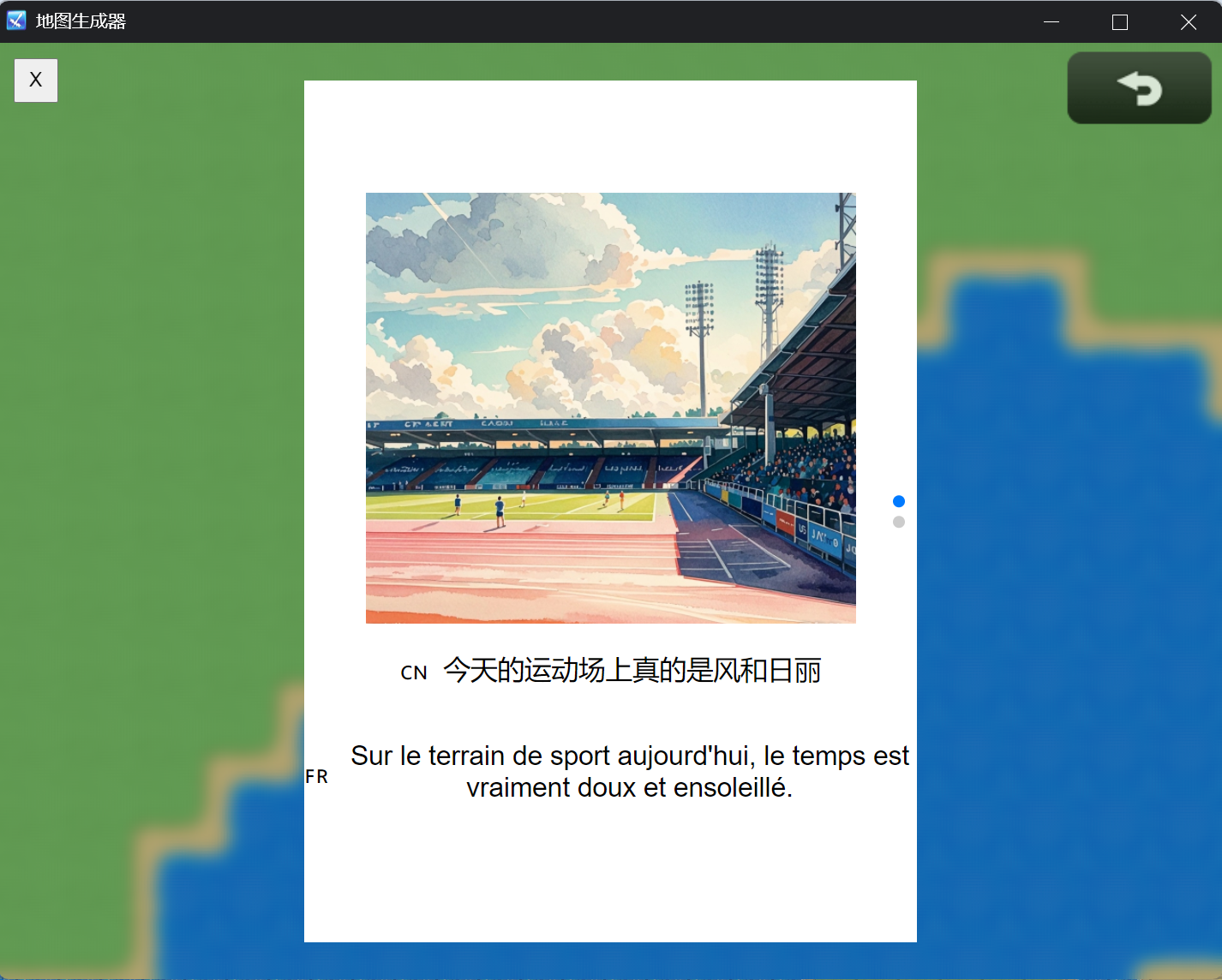
最终的运行效果是这样的
后续还可以圆角,然后看能否让iframe里的js和游戏进行交互