/*:
 * @target MZ
 * @plugindesc Port Investment for RPG MAKER MZ
 * @author lemonhall
 *
 * @command showInvestment
 * @text Show showInvestment
 * @desc Displays the showInvestment of the port
 *
 * @arg url
 * @type string
 * @text URL
 * @desc URL to be loaded in the web viewer.
 * @default https://www.example.com
 *
 * @param closeButtonSize
 * @type number
 * @text Close Button Size
 * @desc Size of the close button in pixels.
 * @default 30
 *
 * @param closeButtonPosition
 * @type select
 * @text Close Button Position
 * @desc Position of the close button.
 * @default Top Right
 * @option Top Left
 * @option Top Center
 * @option Top Right
 * @option Bottom Left
 * @option Bottom Center
 * @option Bottom Right
 *
 * @help
 * To open the web viewer, use the plugin command "Show Web Viewer" in events.
 */

(() => {
    const pluginName = "ShowInvestment";
    const parameters = PluginManager.parameters(pluginName);


    PluginManager.registerCommand(pluginName, "showInvestment", args => {
        SceneManager.push(Scene_ShowInvestment);
        Scene_ShowInvestment.prototype.url = args.url;
        // 我修改了Game_Interpreter的Plugin Command后,添加了eventCaller后,让Plugin在被调用时
        // 能拿到正确的 event信息,方便在event里直接设置运行逻辑,或者让插件逻辑直接获取信息
        //=====================================================================
        // // Plugin Command
        // Game_Interpreter.prototype.command357 = function(params) {
        //     console.log("IN Plugin Command [params]:   ");
        //     // 对象的输出为这个样子
        //     // 0: "WebViewerMZ2"
        //     // 1: "showWebViewer"
        //     // 2: "Show Web Viewer"
        //     // 3: {url: "https://hsp.lemonhall.me/cards/index.html"}
        //     console.log(params);


        //     //!!!!!!!!!!!!!!!!!!!!!!!!!!!!!!!!!!!
        //     //我个人增加的逻辑:
        //     params[3]["eventCaller"] = $dataMap.events[this._eventId];
        //     //检查一下增加的eventCaller是否正确加入了args
        //     console.log("IN Plugin Command params[3][eventCaller]:   ");
        //     console.log(params[3]["eventCaller"]);
        //     //!!!!!!!!!!!!!!!!!!!!!!!!!!!!!!!!!!!
        //=====================================================================

        Scene_ShowInvestment.prototype.eventCaller = args.eventCaller;
    });

    // Window_Command.prototype.refresh = function() {
    //     this.clearCommandList();
    //     this.makeCommandList();
    //     Window_Selectable.prototype.refresh.call(this);
    // };
    //Window_Command继承于Window_Selectable<--Window_Scrollable<---Window_Base
    class Window_InvestmentCommand extends Window_Command {
        makeCommandList () {
            super.makeCommandList();
            var enabled = true
            this.addCommand("投资", "investment", enabled);
            this.addCommand("取消", "cancel", enabled);
        }
    }

    //Scene_MenuBase继承于Scene_Base
    class Scene_ShowInvestment extends Scene_MenuBase {
        create() {
            super.create();
            //showPicture = function(pictureId, name, origin, x, y, scaleX, scaleY, opacity, blendMode)
            //                      console.log(name, origin, x, y, scaleX, scaleY, opacity, blendMode);
            //                                Actor1_8  0     0   0    100     100      255     0
            //$gameScreen.showPicture (1     ,"Actor1_8", 0    ,0 , 0,   100    ,100   ,  255    ,0);
            //以上的方法是不适合的,因为会被遮罩掉
            //
            //
            //Window_Base.prototype.drawFace 这里有一个drawFace方法
            //Window_Base继承于window,属于整个window的基类了
            // prettier-ignore
            // Window_Base.prototype.drawFace = function(
            //     faceName, faceIndex, x, y, width, height
            // ) {
            //     //console.log("Window_Base.prototype.drawFace:");
            //     //console.log( faceName, faceIndex, x, y, width, height);
            //     //             Actor1    0          5  3  144    129
            //     width = width || ImageManager.faceWidth;
            //     height = height || ImageManager.faceHeight;
            //     const bitmap = ImageManager.loadFace(faceName);
            //     const pw = ImageManager.faceWidth;
            //     const ph = ImageManager.faceHeight;
            //     const sw = Math.min(width, pw);
            //     const sh = Math.min(height, ph);
            //     const dx = Math.floor(x + Math.max(width - pw, 0) / 2);
            //     const dy = Math.floor(y + Math.max(height - ph, 0) / 2);
            //     const sx = Math.floor((faceIndex % 4) * pw + (pw - sw) / 2);
            //     const sy = Math.floor(Math.floor(faceIndex / 4) * ph + (ph - sh) / 2);
            //     this.contents.blt(bitmap, sx, sy, sw, sh, dx, dy);
            // };
            this.createCommandWindow();
            //实验性的画个脸出来看看
                        //console.log( faceName, faceIndex, x, y, width, height);
            //this._commandWindow.drawFace("Actor1",0,5,3,144,129);
            //成功了,但是这个x和y啊,是一个相对于这个窗口的x,y,行吧,这也好
            this.createGoldWindow();
            this.createNPCWindow();
            this._npcWindow.drawFace("Actor1",0,5,3,144,129);
            this._npcWindow.update();
            this._npcWindow.drawText("欢迎光临【"+this.eventCaller.name+"】",10,150);
            this._npcWindow.drawText("您是要投资么?",10,200);
            this._npcWindow.update();

            this.createInvestmentWindow();
            this._investmentWindow.drawText("您当前的投资额度为:0",10,0);
            this._investmentWindow.update();
            // Scene_Gameover.prototype.createBackground = function() {
            //     this._backSprite = new Sprite();
            //     this._backSprite.bitmap = ImageManager.loadSystem("GameOver");
            //     this.addChild(this._backSprite);
            // };
            // const spritePic = new Sprite_Picture();
            // spritePic.bitmap = ImageManager.loadSystem("GameOver");
            // console.log(spritePic);
            // this.addChild(spritePic);

        }
        createInvestmentWindow = function() {
            const rect = this.investmentWindowRect();
            const investmentWindow = new Window_Base(rect);
            this.addWindow(investmentWindow);
            this._investmentWindow = investmentWindow;
        }

        investmentWindowRect = function() {
            const ww = 500;
            const wh = this.calcWindowHeight(1, true);
            const wx = 50;
            const wy = this.mainAreaTop()+this.mainAreaHeight();
            return new Rectangle(wx, wy, ww, wh);
        }

        createNPCWindow = function() {
            const rect = this.npcWindowRect();
            const npcWindow = new Window_Base(rect);
            this.addWindow(npcWindow);
            this._npcWindow = npcWindow;
        }
        npcWindowRect = function() {
            const ww = 500;
            const wh = this.mainAreaHeight();
            const wx = 50;
            const wy = 50;
            return new Rectangle(wx, wy, ww, wh);
        }
        createCommandWindow = function() {
            const rect = this.commandWindowRect();
            const commandWindow = new Window_InvestmentCommand(rect);
            commandWindow.setHandler("investment", this.commandInvestment.bind(this));
            commandWindow.setHandler("cancel", this.popScene.bind(this));
            this.addWindow(commandWindow);
            this._commandWindow = commandWindow;
        }
        commandWindowRect = function() {
            // Scene_Base.prototype.mainCommandWidth = function() {
            //     return 240;
            // };
            const ww = this.mainCommandWidth();
            // Scene_MenuBase.prototype.mainAreaHeight = function() {
            //     return Graphics.boxHeight - this.buttonAreaHeight() - this.helpAreaHeight();
            // };
            const wh = this.mainAreaHeight()
            // Scene_Base.prototype.isRightInputMode = function() {
            //     return true;
            // };
            const wx = this.isRightInputMode() ? Graphics.boxWidth - ww : 0;
            // Scene_MenuBase.prototype.mainAreaTop = function() {
            //     if (!this.isBottomHelpMode()) {
            //         return this.helpAreaBottom();
            //     } else if (this.isBottomButtonMode()) {
            //         return 0;
            //     } else {
            //         return this.buttonAreaBottom();
            //     }
            // };
            const wy = this.mainAreaTop();
            return new Rectangle(wx, wy, ww, wh);
        }
        commandInvestment = function() {
            console.log("commandInvestment is fired!!!");
            SceneManager.pop();
        }
        createGoldWindow = function() {
            const rect = this.goldWindowRect();
            this._goldWindow = new Window_Gold(rect);
            this.addWindow(this._goldWindow);
        }
        goldWindowRect = function() {
            const ww = this.mainCommandWidth();
            const wh = this.calcWindowHeight(1, true);
            const wx = Graphics.boxWidth - ww;
            const wy = this.mainAreaTop()+this.mainAreaHeight();
            return new Rectangle(wx, wy, ww, wh);
        }

        // // Show Picture
        // Game_Interpreter.prototype.command231 = function(params) {
        //     const point = this.picturePoint(params);
        //     // prettier-ignore
        //     $gameScreen.showPicture(
        //         params[0], params[1], params[2], point.x, point.y,
        //         params[6], params[7], params[8], params[9]
        //     );
        //     return true;
        // };
        //想显示人物立绘可以参考这个
        // prettier-ignore
        // Game_Screen.prototype.showPicture = function(
        //     pictureId, name, origin, x, y, scaleX, scaleY, opacity, blendMode
        // ) {
        //     const realPictureId = this.realPictureId(pictureId);
        //     const picture = new Game_Picture();
        //     picture.show(name, origin, x, y, scaleX, scaleY, opacity, blendMode);
        //     this._pictures[realPictureId] = picture;
        // };


    }

})();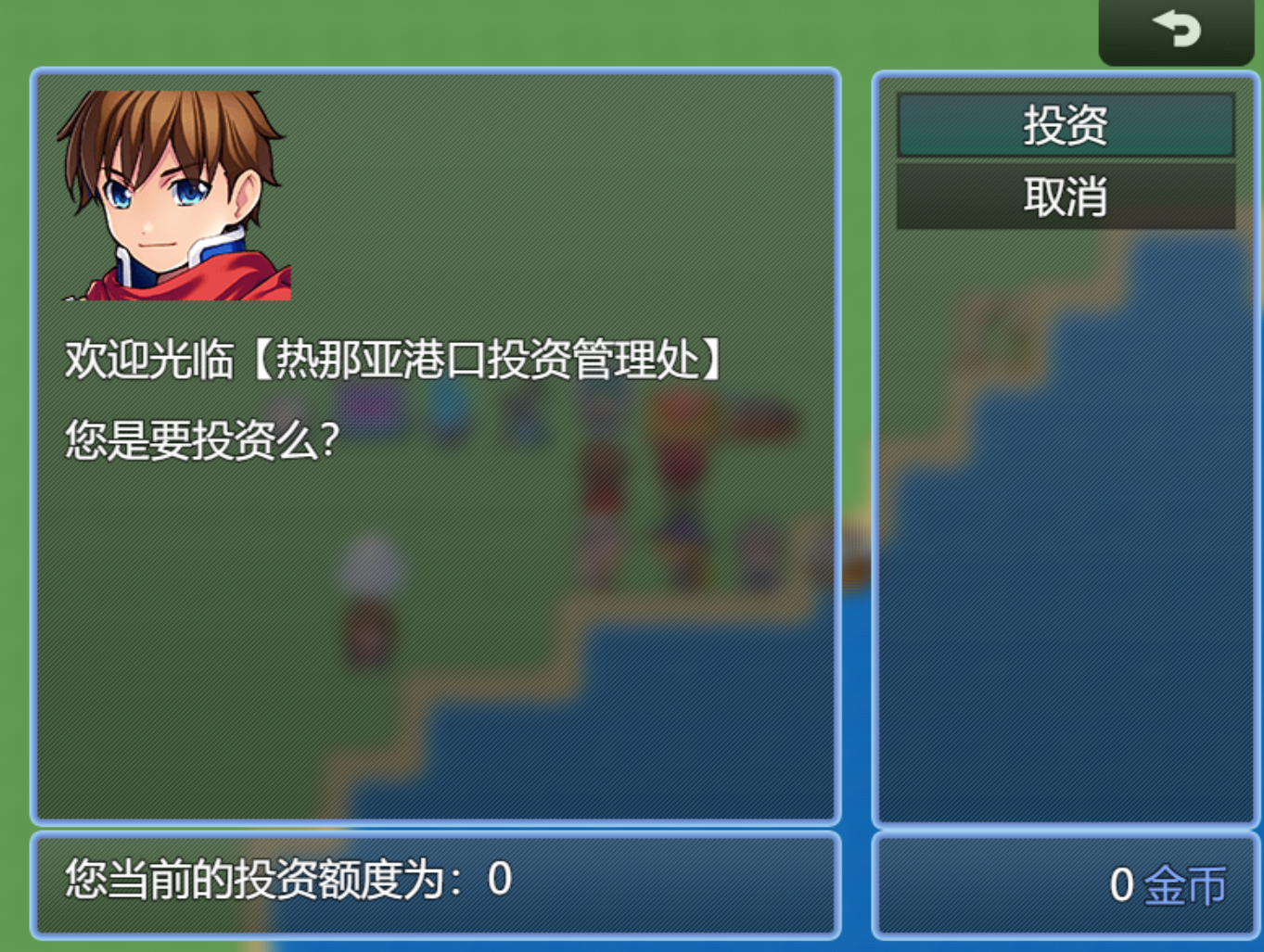
首先是:
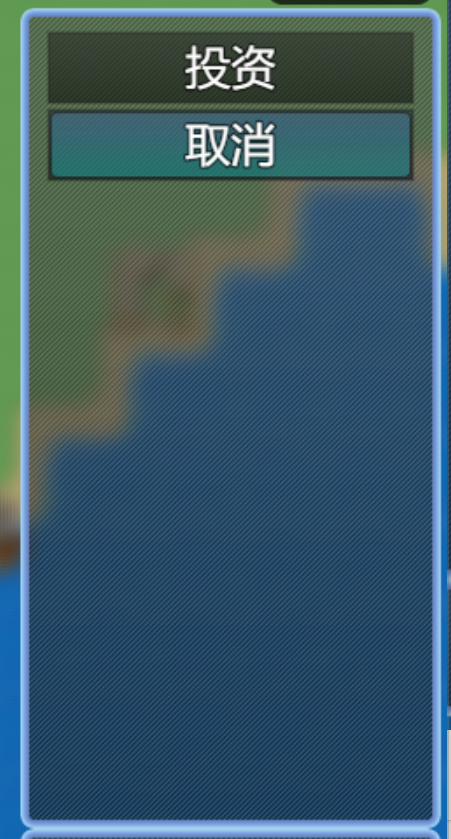
窗体的绘制部分是:
        createCommandWindow = function() {
            const rect = this.commandWindowRect();
            const commandWindow = new Window_InvestmentCommand(rect);
            commandWindow.setHandler("investment", this.commandInvestment.bind(this));
            commandWindow.setHandler("cancel", this.popScene.bind(this));
            this.addWindow(commandWindow);
            this._commandWindow = commandWindow;
        }
        commandWindowRect = function() {
            // Scene_Base.prototype.mainCommandWidth = function() {
            //     return 240;
            // };
            const ww = this.mainCommandWidth();
            // Scene_MenuBase.prototype.mainAreaHeight = function() {
            //     return Graphics.boxHeight - this.buttonAreaHeight() - this.helpAreaHeight();
            // };
            const wh = this.mainAreaHeight()
            // Scene_Base.prototype.isRightInputMode = function() {
            //     return true;
            // };
            const wx = this.isRightInputMode() ? Graphics.boxWidth - ww : 0;
            // Scene_MenuBase.prototype.mainAreaTop = function() {
            //     if (!this.isBottomHelpMode()) {
            //         return this.helpAreaBottom();
            //     } else if (this.isBottomButtonMode()) {
            //         return 0;
            //     } else {
            //         return this.buttonAreaBottom();
            //     }
            // };
            const wy = this.mainAreaTop();
            return new Rectangle(wx, wy, ww, wh);
        }
然后是:
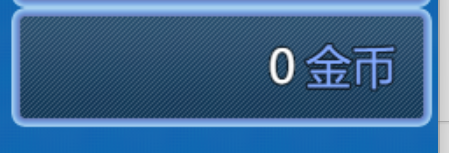
        createGoldWindow = function() {
            const rect = this.goldWindowRect();
            this._goldWindow = new Window_Gold(rect);
            this.addWindow(this._goldWindow);
        }
        goldWindowRect = function() {
            const ww = this.mainCommandWidth();
            const wh = this.calcWindowHeight(1, true);
            const wx = Graphics.boxWidth - ww;
            const wy = this.mainAreaTop()+this.mainAreaHeight();
            return new Rectangle(wx, wy, ww, wh);
        }
接着是:

        createInvestmentWindow = function() {
            const rect = this.investmentWindowRect();
            const investmentWindow = new Window_Base(rect);
            this.addWindow(investmentWindow);
            this._investmentWindow = investmentWindow;
        }

        investmentWindowRect = function() {
            const ww = 500;
            const wh = this.calcWindowHeight(1, true);
            const wx = 50;
            const wy = this.mainAreaTop()+this.mainAreaHeight();
            return new Rectangle(wx, wy, ww, wh);
        }
最后一部分是:
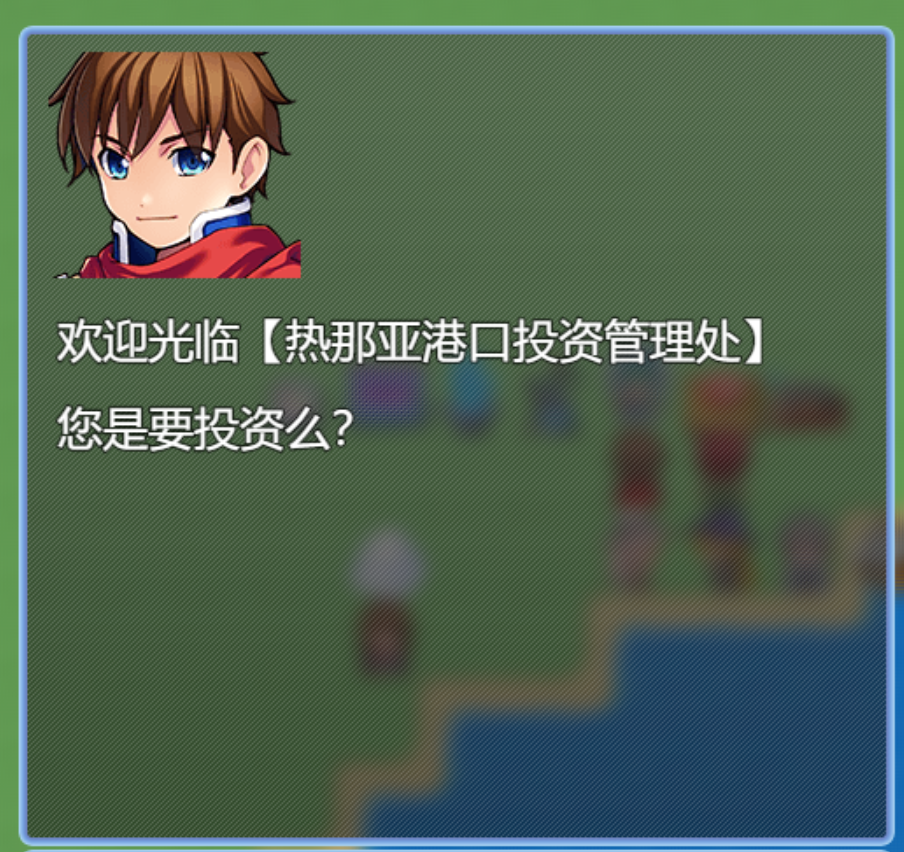
        createNPCWindow = function() {
            const rect = this.npcWindowRect();
            const npcWindow = new Window_Base(rect);
            this.addWindow(npcWindow);
            this._npcWindow = npcWindow;
        }
        npcWindowRect = function() {
            const ww = 500;
            const wh = this.mainAreaHeight();
            const wx = 50;
            const wy = 50;
            return new Rectangle(wx, wy, ww, wh);
        }
==========================================
然后它们的入口是:
 create() {
            super.create();

            this.createCommandWindow();

            this.createGoldWindow();
            this.createNPCWindow();
            this._npcWindow.drawFace("Actor1",0,5,3,144,129);
            this._npcWindow.update();
            this._npcWindow.drawText("欢迎光临【"+this.eventCaller.name+"】",10,150);
            this._npcWindow.drawText("您是要投资么?",10,200);
            this._npcWindow.update();

            this.createInvestmentWindow();
            this._investmentWindow.drawText("您当前的投资额度为:0",10,0);
            this._investmentWindow.update();


        }
等于是先画命令窗口,再画金币窗口,再画npc窗口,然后在npc窗口里画脸,并且写字
最后画投资窗口,并显示投资额度
==========================================================
    // Window_Command.prototype.refresh = function() {
    //     this.clearCommandList();
    //     this.makeCommandList();
    //     Window_Selectable.prototype.refresh.call(this);
    // };
    //Window_Command继承于Window_Selectable<--Window_Scrollable<---Window_Base
    class Window_InvestmentCommand extends Window_Command {
        makeCommandList () {
            super.makeCommandList();
            var enabled = true
            this.addCommand("投资", "investment", enabled);
            this.addCommand("取消", "cancel", enabled);
        }
    }
命令窗口里使用了Window_Command
//Window_Command继承于Window_Selectable<--Window_Scrollable<---Window_Base==========================================================
同时:
        createCommandWindow = function() {
            const rect = this.commandWindowRect();
            const commandWindow = new Window_InvestmentCommand(rect);
            commandWindow.setHandler("investment", this.commandInvestment.bind(this));
            commandWindow.setHandler("cancel", this.popScene.bind(this));
            this.addWindow(commandWindow);
            this._commandWindow = commandWindow;
        }
配置了两个命令的监听函数:
        commandInvestment = function() {
            console.log("commandInvestment is fired!!!");
            SceneManager.pop();
        }
其中投资命令要记得处理完后pop出场景管理器
==============================================
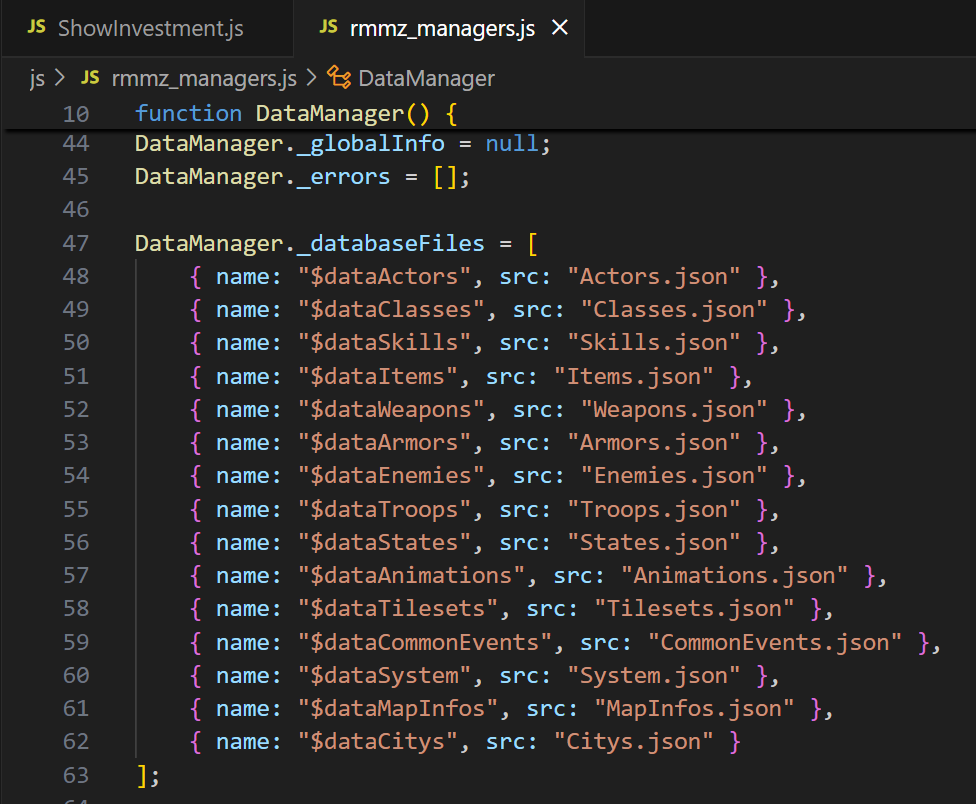
存储的化,在dataManager里引json文件就可以了
然后第二步:
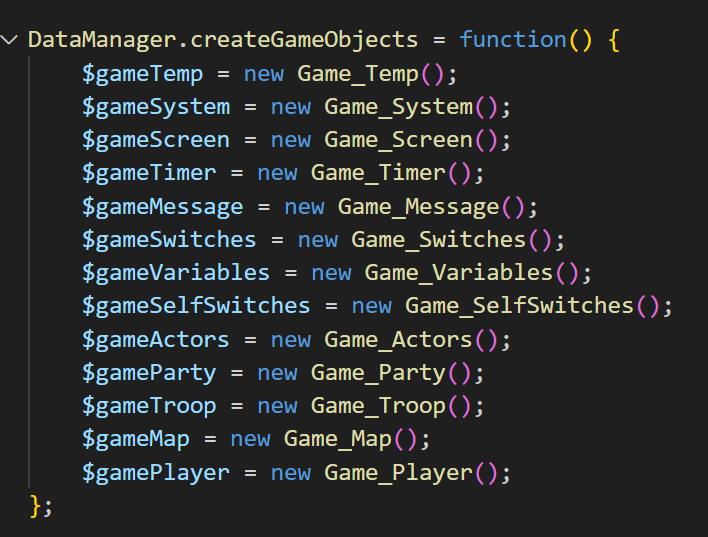
其实是应该增添一个gameObject的
然后去操作$gameCitys这个对象【假设它已经存在了哈】
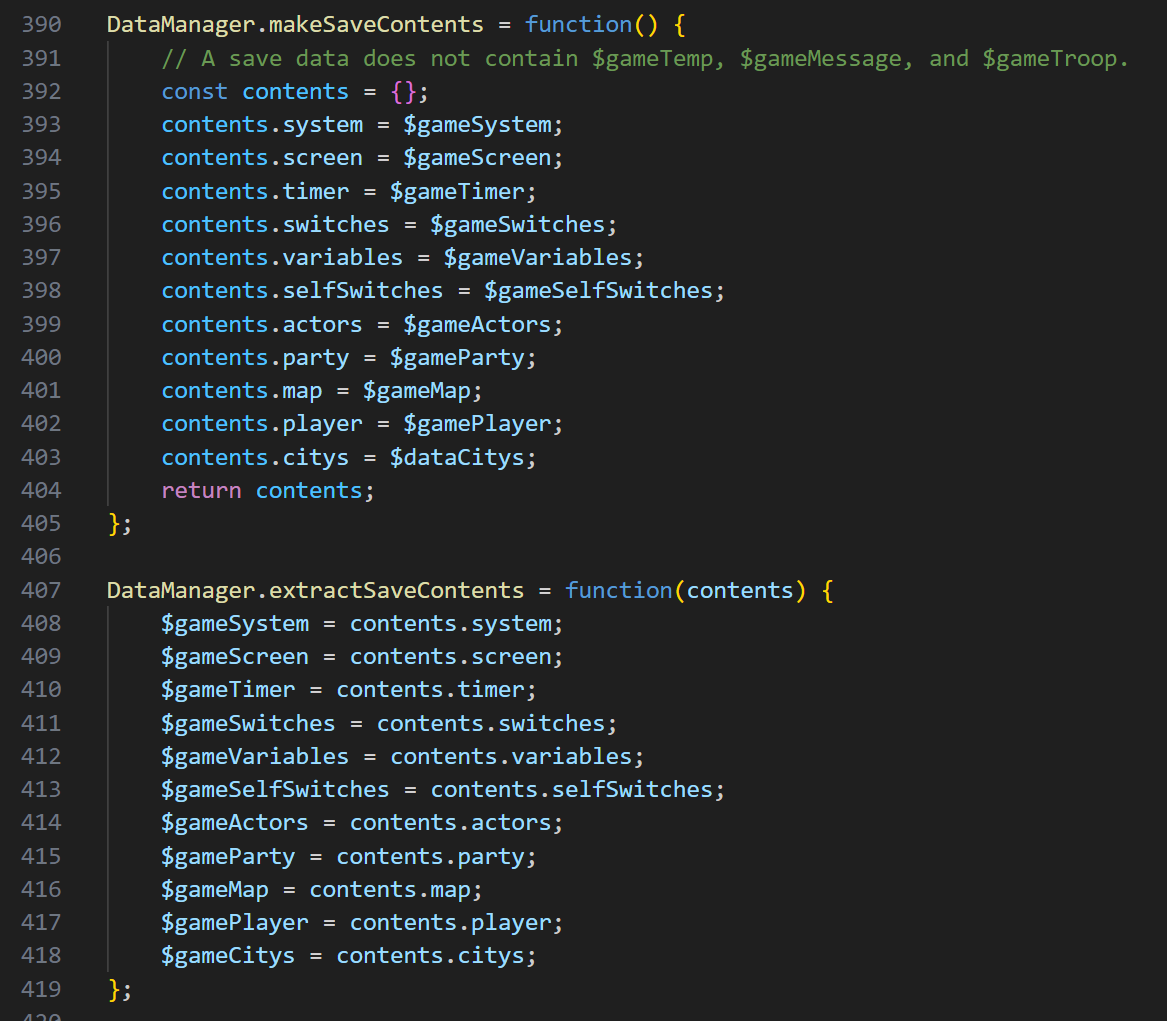
操作完了以后,在makeSave和extractSave这两个函数里,分别挂上你新添加的东西就行了
这个不能靠重载来实现
因为游戏机制里,DataManager你也看到了,不带原型链,所以它本质上不是一个类
而是一个上来就已经实例化了的单体
所以你没法重载它
暂时只能直接修改DataManager,这个稍后我再看看有什么技巧吧
==================================================================
这样,这个插件就实现了:
1、新建一个自己的场景:港口投资管理处
2、新建了四个窗口
3、与load/save联动来修改citys的数据
==================================================================
// Plugin Command
Game_Interpreter.prototype.command357 = function(params) {
    console.log("IN Plugin Command [params]:   ");
    // 对象的输出为这个样子
    // 0: "WebViewerMZ2"
    // 1: "showWebViewer"
    // 2: "Show Web Viewer"
    // 3: {url: "https://hsp.lemonhall.me/cards/index.html"}
    console.log(params);


    //!!!!!!!!!!!!!!!!!!!!!!!!!!!!!!!!!!!
    //我个人增加的逻辑:
    params[3]["eventCaller"] = $dataMap.events[this._eventId];
    //检查一下增加的eventCaller是否正确加入了args
    console.log("IN Plugin Command params[3][eventCaller]:   ");
    console.log(params[3]["eventCaller"]);
    //!!!!!!!!!!!!!!!!!!!!!!!!!!!!!!!!!!!

    const pluginName = Utils.extractFileName(params[0]);
    // 这里是callCommand的具体实现:
    // PluginManager.callCommand = function(self, pluginName, commandName, args) {
    //     const key = pluginName + ":" + commandName;
    //     const func = this._commands[key];
    //     if (typeof func === "function") {
    //         func.bind(self)(args);
    //     }
    // };
    PluginManager.callCommand(this, pluginName, params[1], params[3]);
    console.log("IN Plugin Command [this]:   ");
    // 这个时候,this就是 Game_Interpreter 本身了
    // _branch: {}
    // _characterId: 0
    // _childInterpreter: null
    // _comments: ""
    // _depth: 0
    // _eventId: 21
    // _frameCount: 125
    // _freezeChecker: 1
    // _indent: 0
    // _index: 1
    // _list: (3) [{…}, {…}, {…}]
    // _mapId: 1
    // _waitCount: 0
    // _waitMode: ""
    console.log(this);
    // 输出是:IN Plugin Command params[1]:   showWebViewer
    console.log("IN Plugin Command params[1]:   "+params[1]);
    console.log("IN Plugin Command params[3]:   "+params[3]);
    //实际上就是这个:{url: "https://hsp.lemonhall.me/cards/index.html"}
    console.log(params[3]);

    //使用$dataMap.events[21].name,可以得到当前地图上21号event的name
    //所以更优雅的方式是,可以直接把$dataMap.events[21]这个对象,塞入params[3]里面去
    //这样

    return true;
};
最后一个其实有点鸡肋
就是修改了Game_Interpreter.prototype.command357
给插件传参,直接把caller的event信息传给了插件

这样插件就可以直接这么使用eventCaller对象了
意思不大,但更加优雅了
这也是直接修改了引擎本身,要注意;